
5.1 View attached documents
Access: You can access Document Details panel from the Analysis or Sources section.
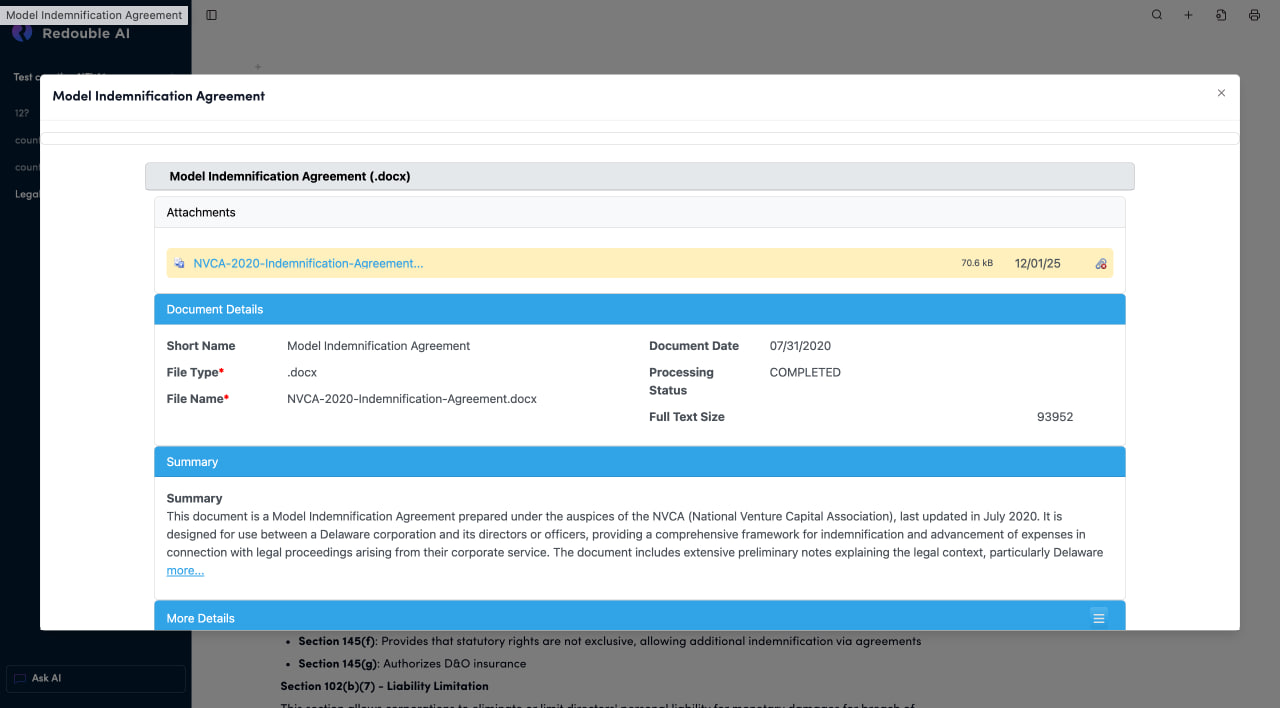
The Document Details View provides comprehensive information about uploaded documents, including metadata, processing status, AI-generated summary, and detailed document analysis.
Panel Structure
Document Title Bar
- Displays the document name at the top of the panel
- Close Button (×): Located in the top-right corner to close the panel
Document Name Bar
- Displays document name with file format in parentheses
- Appearence: Gray horizontal bar below the title
Purpose: Primary identifier showing the document name and file type at a glance.
Section: Attachments
Purpose: Shows the source file(s) associated with this document entry.
File Entry Components:
- File Icon: Document type indicator (PDF, Word, etc.)
- File Name: Clickable blue link to download/view the file
- File Size: Size of the attachment
- Date: Upload or modification date (format: MM/DD/YY)
- Link Icon: Action icon on the right for additional options
Available Actions:
- Click file name: Download or view the attachment
- Click link icon: To delete attachment
Section: Document Details
This section displays metadata about the document, organized in a two-column layout. Visual Style: Yellow/cream colored header bar with "Document Details" title
Fields Overview:
- Short Name: Brief identifier for quick document recognition
- Document Date: Date associated with the document content
- File Type: File format extension (required)
- Processing Status: Current processing state (Completed, Processing, Failed, Pending)
- File Name Original filename as uploaded (required)
- Full Text Size: Size of extracted text content in characters
Section: Summary
This section displays the AI-generated summary of the document content
Visual Style: Yellow/cream colored header bar with "Summary" title
Summary Field
- Type: Multi-line text display
- Purpose: Concise AI-generated overview of the document's content
- Auto-generated: Yes, during document processing
Content Includes:
- Document type identification
- Key purpose and function
- Main parties or entities involved
- Primary subject matter
- Important context or background
"more...":
- Located at the end of the summary text
- Click to expand and view the full summary
- Useful for longer documents with detailed summaries
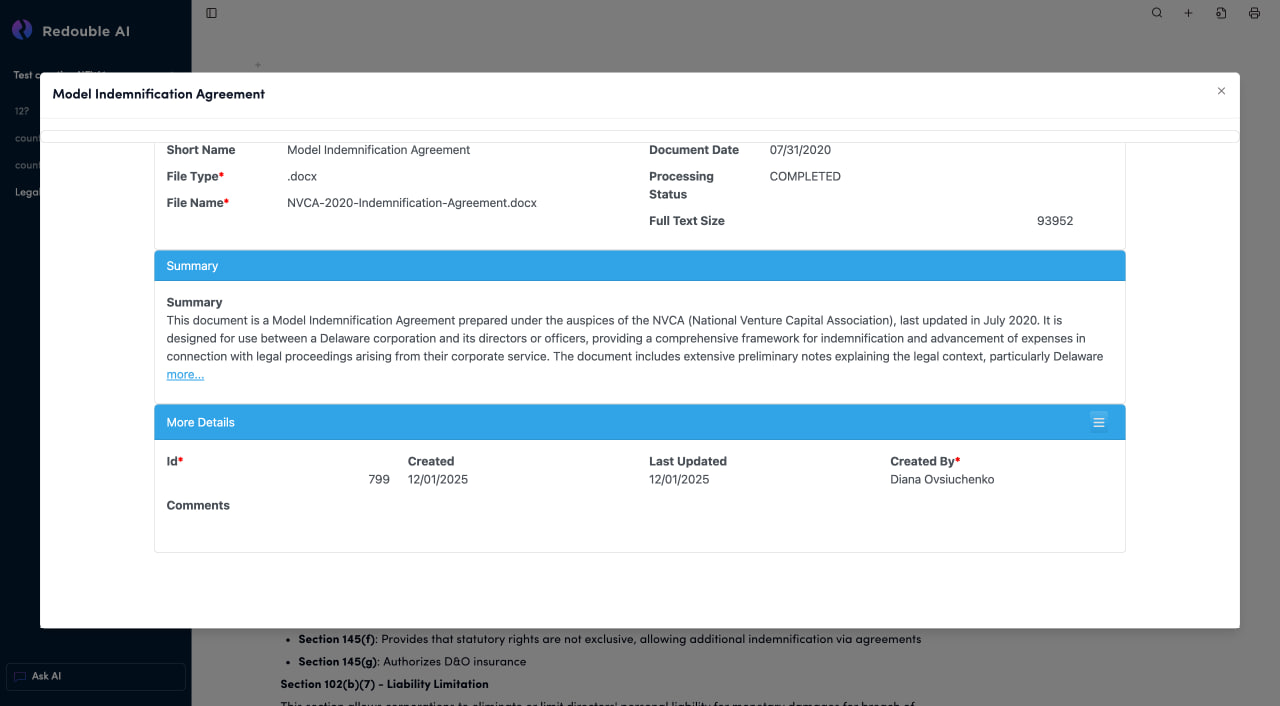
Section: More Details
This section contains system metadata about the document record, as well as AI-extracted detailed content from the document.
Visual Style: Blue collapsible header bar with "More Details" title
- Id: Unique system identifier for this document record (required, auto-generated)
- Created: Date when the document record was created in the system
- Last Updated: Date of the most recent modification to the record
- Created By: Username of the person who created the document record (required)
- Comments Free-form text field for notes about the document
Field Details:
Id (Required)
- Type: Numeric
- Auto-generated: Yes
- Immutable: Cannot be changed after creation
Created
- Type: Date
- Format: MM/DD/YYYY
- Auto-generated: Yes
Last Updated
- Type: Date
- Format: MM/DD/YYYY
- Updates when:
- Metadata is edited
- Attachments are added/removed
- Document is reprocessed
Created By (Required)
- Type: Text (username)
- Auto-generated: Yes, based on logged-in user
Comments
- Type: Multi-line text field
- Purpose: Free-form notes about the document
- Usage:
- Document notes and observations
- Processing issues or special handling
- Review comments
- Team communication
No comments to display
No comments to display