4.4 Sources
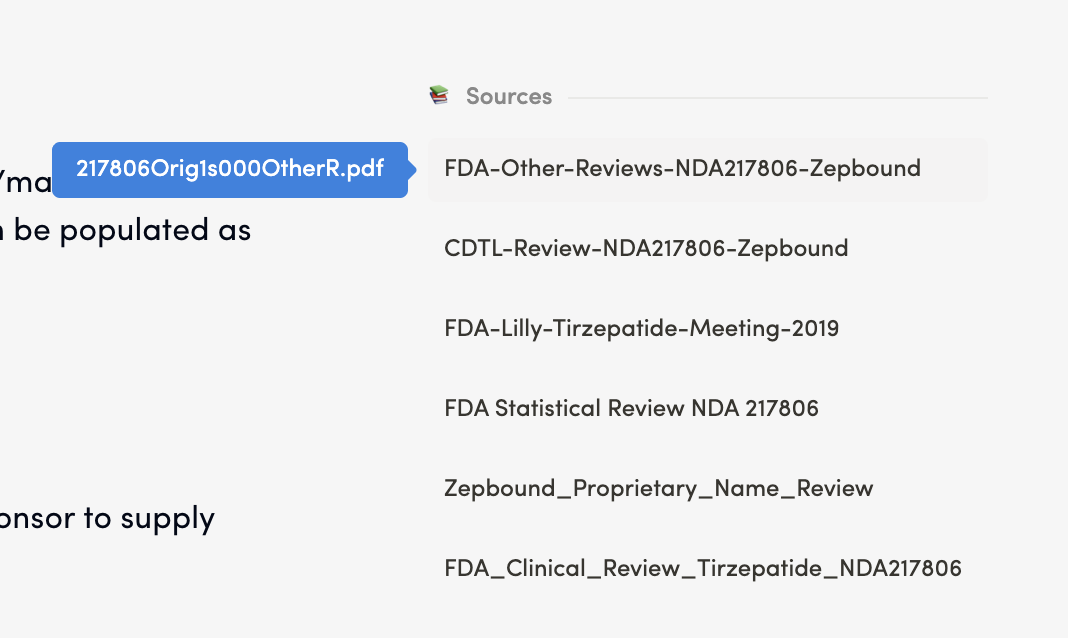
Purpose: The Sources Section is a feature of the Redouble AI system that ensures transparency and traceability in AI-generated answers. It displays all documents that contributed to the response, allowing you to verify information and access the original sources.sources/ inputs. It is displayed at the end of generatedan question answersanswer or in a dedicated panel on the right-hand side panel.of the interface.
Functionality
Viewing Sourcessources
Steps:
- Generate or open an answer to a question
- Scroll to the bottom or to the side panel where the Sources are displayed
- Review the list of referenced documents
Result: You can see all documents that contributed to the answer. When you hover over,over a given document in the list, the name of the document from the "Atachments"Attachments" section will be visible in blue tooltipdisplayed.
Accessing Sourcesource Documentsdocuments
Steps:
- Locate the desired document in the Sources list
- Click on the document name in the list
DocumentThe document content will appear in a separate panel
Result: You can review the original document content