
Interface Overview
There are two main screens:
1. Workflow runs (Traces list)
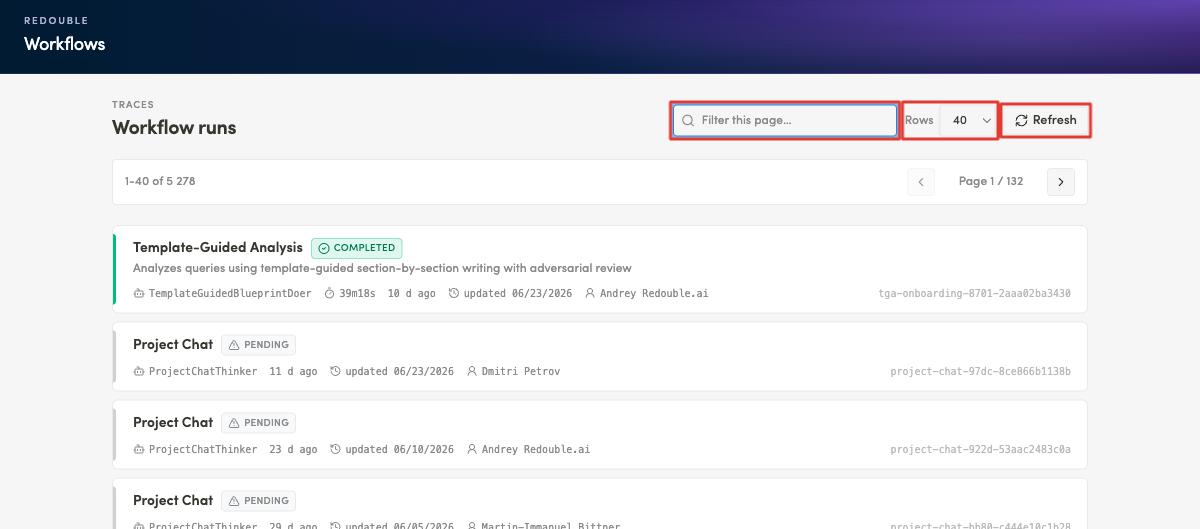
The landing screen. It lists every workflow run and lets you search and page through them.
- Header: Workflows / Workflow runs (Traces)
- Filter field — "Filter this page…".
- Rows per page selector — 20 / 40 / 80 / 120.
- Refresh button and page navigation (Previous / Next).
- Run cards — each shows the process name, status badge, executor duration, relative time, update date, author/owner and a unique ID.
2. Trace detail
Opens when you click a run. It breaks one run down into nodes and steps.
- Top bar
- View switcher: Graph / Waterfall / Tree.
- Side panels group: Deps / Tool I/O / Details.
- Visualization area — the graph and waterfall.
- Right-hand panels — Inspector / LLM call / Trace tree.
Result: You understand where the run list lives, where a single trace is analysed, and which controls switch between views and panels.